
Introduction
Businesses today are under constant pressure to do more with fewer resources. Customers expect faster responses, employees need quick access to information, and business leaders rely on accurate data to make informed decisions. Yet, many organizations still spend valuable time on repetitive manual tasks that slow down operations and increase the risk of errors.
Simple activities like approving invoices, assigning sales leads, processing leave requests, or responding to customer inquiries often involve multiple emails, spreadsheets, and follow-ups. For many organizations, these growing operational challenges are the reason they start exploring workflow automation.
This is where workflow automation software makes a real difference. By automating routine tasks and creating structured workflows, businesses can reduce manual effort, improve collaboration, and ensure that work moves smoothly from one stage to the next. Instead of spending time chasing approvals or updating records, employees can focus on higher-value activities that contribute to business growth.
In this guide, you’ll learn what workflow automation software is, how it works, its key features and benefits, and the factors to consider when choosing the right solution for your business.
What Is Workflow Automation Software?
Workflow automation software is a digital solution that automates repetitive business processes by following predefined rules and actions. Instead of relying on manual intervention for every step, the software automatically routes tasks, sends notifications, collects information, and updates records based on conditions you define. In simple terms, it helps businesses complete routine tasks faster and more consistently. Whether it’s approving a purchase request, assigning a customer inquiry to the right support agent, or notifying a manager about a pending approval, workflow automation ensures that every task follows the correct process without unnecessary delays. Unlike manual workflows, where employees need to remember each step, send emails, or update spreadsheets, automated workflows perform these actions automatically. This not only saves time but also minimizes the chances of missed tasks, communication gaps, and human errors.
For example, imagine a company receiving a new sales enquiry through its website. In a manual process, someone would need to check the enquiry, assign it to a salesperson, send an acknowledgment email, and update the CRM system. With workflow automation software, these actions happen automatically. The enquiry is assigned based on predefined rules, the customer receives an instant confirmation, and the CRM is updated without manual effort. Businesses of all sizes are adopting workflow automation because it simplifies day-to-day operations while improving consistency and efficiency. Small businesses benefit by reducing administrative work, while larger organizations use automation to manage complex processes across multiple departments.
How Workflow Automation Software Works
Although every platform offers different capabilities, most workflow automation software follows a straightforward process:
- A task or event triggers the workflow. This could be a new customer enquiry, an employee submitting a leave request, or an invoice being uploaded.
- The software follows predefined business rules. It determines what should happen next based on conditions set by the organization.
- Tasks are automatically assigned. The right employee or department receives the task without manual intervention.
- Notifications and reminders are sent. Stakeholders are informed whenever action is required or deadlines are approaching.
- The workflow is completed and recorded. Every action is tracked, creating better visibility and accountability throughout the process.
This structured approach helps businesses standardize operations while reducing delays caused by manual coordination.
Manual Workflows vs. Automated Workflows
Understanding the difference between manual and automated workflows highlights why many organizations are investing in automation.
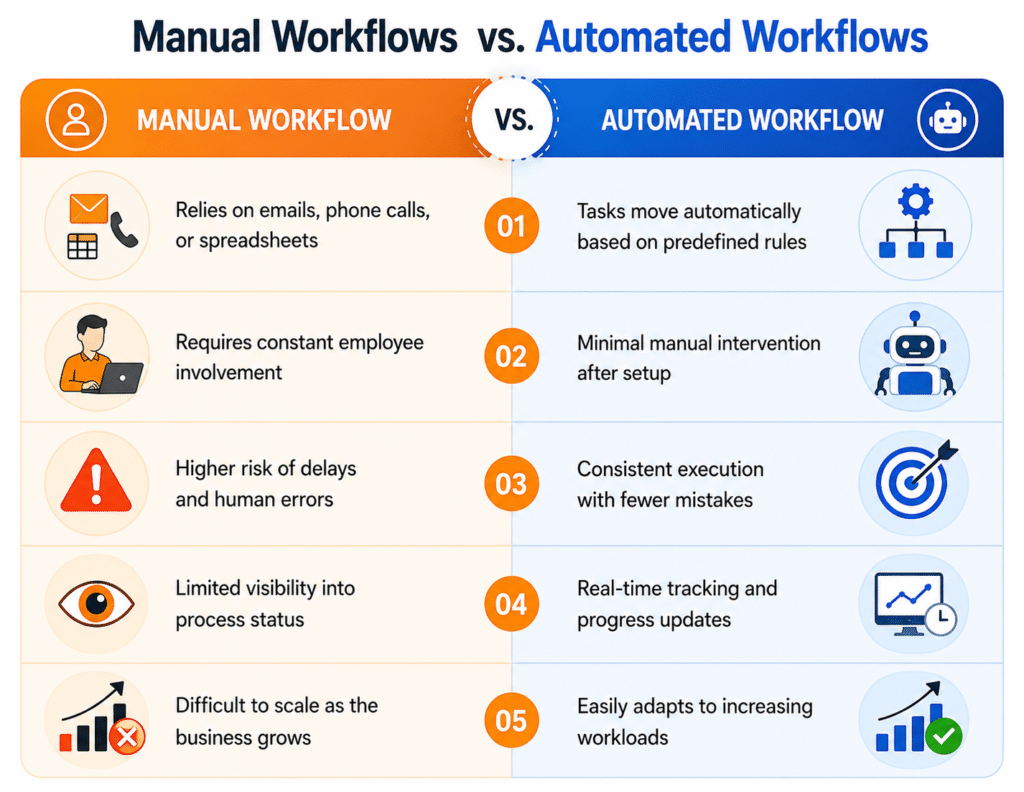
As businesses expand, managing operations manually becomes increasingly challenging. Workflow automation provides a more reliable and scalable approach, ensuring that every process is completed accurately and on time.
Common Business Processes That Can Be Automated
Workflow automation software can be applied across almost every department. Some of the most common use cases include:
- Employee onboarding: Automatically assign onboarding tasks, collect required documents, and notify HR and managers when each step is completed.
- Invoice approvals: Route invoices to the appropriate approvers, send reminders for pending approvals, and maintain a clear approval history.
- Leave requests: Allow employees to submit leave applications online while automatically notifying managers and updating leave balances after approval.
- Sales lead assignment: Distribute new leads to sales representatives based on territory, product, or availability, ensuring quicker follow-up.
- Customer support ticket routing: Direct incoming support requests to the appropriate team based on issue type, priority, or customer category to reduce response times.
These examples demonstrate how workflow automation simplifies everyday operations, reduces repetitive work, and creates a more organized way of managing business processes
Key Features of Workflow Automation Software
Not every workflow automation solution offers the same capabilities, so understanding the core features can help you identify a platform that matches your business requirements. The right software should simplify processes, reduce manual work, and integrate smoothly with your existing business systems. Below are the key features to look for when evaluating workflow automation software.
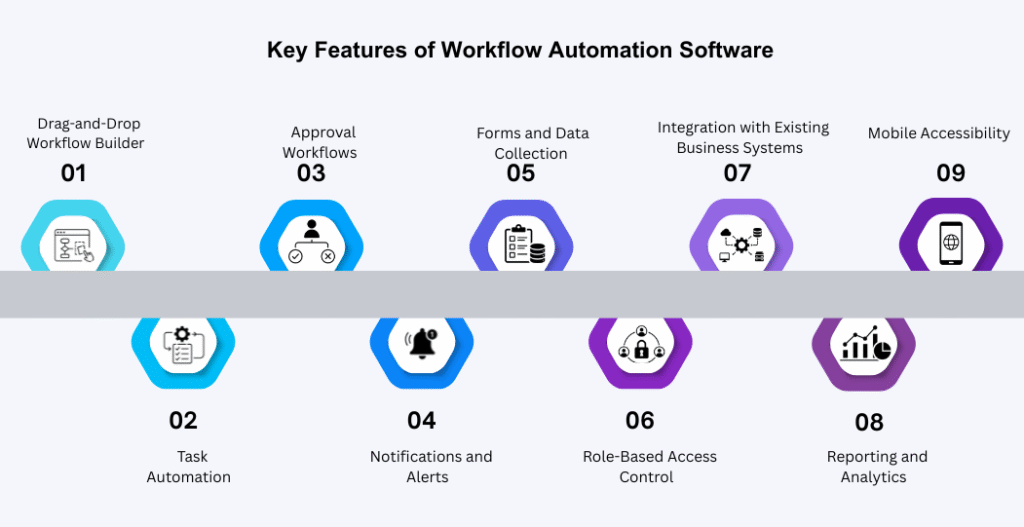
Drag-and-Drop Workflow Builder
One of the most valuable features of modern workflow automation software is a drag-and-drop workflow builder. Instead of writing complex code, users can create workflows visually by arranging different process steps on a digital canvas. This makes it easier for both technical and non-technical users to design, modify, and optimize workflows as business needs change.
For example, an HR team can create an employee onboarding workflow by connecting steps such as document submission, manager approval, IT asset allocation, and orientation scheduling. If the process changes in the future, the workflow can be updated quickly without rebuilding it from scratch.
A visual workflow builder also helps organizations standardize their processes, making them easier to understand and maintain across different departments.
Task Automation
Manual task management often leads to delays, missed deadlines, and unnecessary administrative work. Workflow automation software eliminates these challenges by automatically assigning tasks based on predefined rules.
For instance, when a customer submits an enquiry through a website, the software can instantly assign it to the appropriate sales representative based on location, product category, or workload. Similarly, purchase requests can be routed to department managers without requiring manual intervention.
By automating routine tasks, employees spend less time on repetitive activities and more time on work that adds value to the business.
Approval Workflows
Many business processes involve approvals from one or more stakeholders. Managing these approvals manually through emails or phone calls can slow operations and make it difficult to track progress.
Workflow automation software simplifies this process by automatically routing approval requests to the appropriate individuals. Once a request is approved, rejected, or requires additional information, the system immediately triggers the next step in the workflow.
Approval workflows are commonly used for expense reimbursements, purchase orders, employee leave requests, contract reviews, and invoice processing. Since every action is recorded, businesses gain better transparency and accountability throughout the approval process.
Notifications and Alerts
Timely communication is essential for keeping business processes moving. Workflow automation software includes automated notifications and alerts that keep employees informed whenever action is required.
Instead of manually reminding team members about pending tasks, the system automatically sends email notifications, in-app alerts, or mobile notifications based on predefined conditions. It can also notify managers about overdue approvals or alert support teams when high-priority tickets are received.
These automated reminders help reduce delays, improve response times, and ensure that important tasks are not overlooked.
Forms and Data Collection
Collecting information through emails, spreadsheets, or paper forms often results in incomplete or inconsistent data. Workflow automation software addresses this challenge by providing digital forms that standardize data collection.
Employees, customers, or vendors can submit information using structured forms, ensuring that all required details are captured before the workflow continues. This reduces manual data entry, improves accuracy, and minimizes the need for follow-up communication.
Whether it’s a leave application, customer enquiry, purchase request, or service request, digital forms create a more organized and efficient process while improving the quality of business data.
Role-Based Access Control
Not every employee should have access to every process or business document. Workflow automation software includes role-based access controls that ensure users can only view or perform actions relevant to their responsibilities.
For example, HR personnel can access employee records, finance teams can review invoices, and department managers can approve requests assigned to them. Restricting access based on roles improves data security while reducing the risk of unauthorized changes or accidental errors.
This feature is particularly valuable for organizations handling confidential employee, financial, or customer information.
Integration with Existing Business Systems
A workflow automation platform delivers greater value when it works seamlessly with the tools your business already uses. Instead of operating as a separate application, it should connect with existing systems to create a more connected and efficient workflow.
For example, integrating with a CRM system allows customer information to flow automatically between sales and support teams. Connecting with ERP software helps automate purchasing, inventory, and financial processes. Email integration enables automatic notifications, while helpdesk systems can automatically create and assign support tickets. Integration with HRMS platforms simplifies employee onboarding, leave management, and attendance-related workflows.
By connecting multiple business applications, workflow automation eliminates duplicate data entry and ensures that information remains consistent across the organization.
Reporting and Analytics
Understanding how business processes perform is just as important as automating them. Workflow automation software provides reporting and analytics features that help organizations monitor workflow performance in real time.
Businesses can track completed tasks, pending approvals, average processing times, workflow bottlenecks, and overall operational efficiency. These insights enable managers to identify areas where processes can be improved and make informed decisions based on actual business data rather than assumptions.
Regular reporting also helps organizations measure the impact of automation and identify opportunities for continuous improvement.
Mobile Accessibility
Today’s workforce is no longer limited to the office. Employees often need to review tasks, approve requests, or monitor business processes while working remotely or travelling.
Workflow automation software with mobile accessibility allows users to stay connected from smartphones and tablets. Managers can approve requests, sales teams can update customer information, and support staff can respond to urgent issues without waiting to access a desktop computer.
This flexibility helps businesses maintain productivity regardless of where employees are working and ensures that important processes continue without unnecessary delays.
Why These Features Matter
The true value of workflow automation software lies in how these features work together to streamline business operations. From automating repetitive tasks and simplifying approvals to integrating with existing systems and providing real-time visibility, each capability contributes to a more efficient and organized workplace.
Rather than simply replacing manual tasks, workflow automation creates standardized processes that improve consistency, reduce delays, and support better decision-making across the organization.
Benefits of Workflow Automation Software
Implementing workflow automation software is more than replacing manual tasks with digital processes. It helps businesses work more efficiently, improve collaboration, and create consistent workflows across departments. Whether you’re a small business looking to save time or a growing enterprise managing complex operations, workflow automation can deliver measurable improvements.
Here are some of the key benefits businesses can expect.
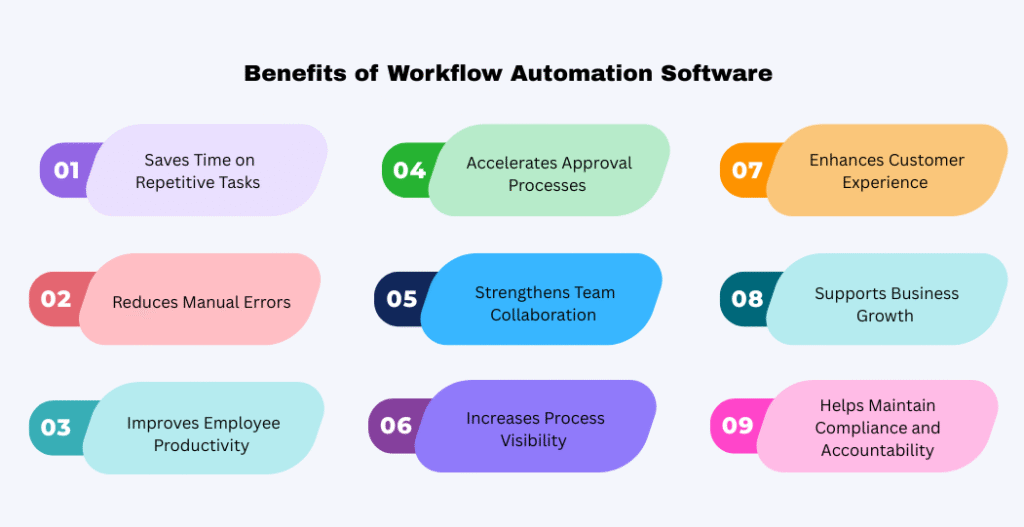
Saves Time on Repetitive Tasks
Many employees spend a significant part of their day performing repetitive administrative work such as assigning tasks, sending follow-up emails, updating records, or requesting approvals. Although these tasks are important, they consume valuable time that could be better spent on strategic or customer-focused activities.
Workflow automation software handles these repetitive processes automatically. Once a workflow is configured, tasks are triggered based on predefined conditions without requiring manual intervention. This reduces administrative workload and allows employees to focus on work that contributes directly to business growth.
For example, instead of manually assigning every new customer enquiry to a sales representative, the system can automatically allocate leads based on location, product category, or team availability.
Reduces Manual Errors
Human errors are common when business processes rely heavily on manual data entry, emails, or spreadsheets. Missing information, incorrect approvals, duplicate records, and forgotten follow-ups can create delays and affect overall business performance.
Workflow automation software minimizes these risks by ensuring every process follows predefined rules. Required information is validated before submission, tasks move through the correct approval stages, and notifications are sent automatically whenever action is needed.
This consistency improves data accuracy while reducing costly mistakes that often result from manual handling.
Improves Employee Productivity
Employees are most productive when they can focus on meaningful work rather than routine administrative tasks. Workflow automation removes unnecessary manual activities and creates a more structured way of working.
Instead of spending time tracking approvals or searching through email conversations, employees receive clear task assignments, automated reminders, and real-time updates. This reduces confusion, improves accountability, and helps teams complete work more efficiently.
As a result, departments can manage higher workloads without increasing administrative effort.
Accelerates Approval Processes
Approval delays are one of the most common reasons business processes slow down. Documents often remain in inboxes waiting for review, causing unnecessary bottlenecks across departments.
Workflow automation software speeds up approvals by automatically routing requests to the appropriate decision-makers. If an approver is unavailable or a request remains pending for too long, the system can send reminders or escalate the request based on predefined rules.
Whether it’s approving invoices, purchase requests, employee leave, or contracts, automated approval workflows help businesses complete processes faster while maintaining transparency.
Strengthens Team Collaboration
Business processes often involve multiple departments working together. Without a structured workflow, communication gaps can occur, resulting in duplicated work, missed deadlines, or unclear responsibilities.
Workflow automation software provides a centralized process where every participant understands their role and can monitor the progress of assigned tasks. Notifications, status updates, and shared workflow visibility help departments collaborate more effectively without relying on constant emails or phone calls.
Improved collaboration leads to faster decision-making and smoother business operations.
Increases Process Visibility
One of the biggest challenges with manual workflows is the lack of visibility. Managers often struggle to identify where a task is delayed or who is responsible for the next action.
Workflow automation software provides real-time tracking throughout the entire process. Managers can monitor workflow status, identify pending approvals, view completed tasks, and detect bottlenecks before they impact business performance.
This level of visibility supports better operational control and enables faster resolution of process-related issues.
Enhances Customer Experience
Efficient internal processes have a direct impact on customer satisfaction. Customers expect quick responses, accurate information, and timely service regardless of the industry.
Workflow automation helps businesses respond faster by automatically assigning customer enquiries, routing support tickets, scheduling follow-ups, and keeping customers informed throughout the process.
For example, when a support request is submitted, the system can immediately assign the ticket to the appropriate support agent while sending an acknowledgment email to the customer. This reduces response times and creates a more professional customer experience.
Supports Business Growth
As organizations grow, managing larger volumes of work manually becomes increasingly difficult. Hiring additional staff to perform repetitive administrative tasks is not always the most efficient solution.
Workflow automation software enables businesses to handle increasing workloads without significantly increasing operational complexity. Standardized processes make it easier to maintain consistency across departments, locations, and teams while supporting future expansion.
Because workflows can be modified as business requirements change, organizations can continue improving their operations without redesigning their processes from the beginning.
Helps Maintain Compliance and Accountability
Many industries require businesses to follow specific policies, approval procedures, and documentation standards. Manual processes make it difficult to maintain complete records and demonstrate compliance during audits.
Workflow automation software automatically records every action taken within a workflow, including submissions, approvals, modifications, and completion times. This creates a reliable audit trail while improving accountability across the organization.
Having clear records also simplifies internal reviews and supports regulatory compliance where required.
How to Choose the Right Workflow Automation Software
With numerous workflow automation platforms available, selecting the right solution requires more than comparing features. Every business has different operational needs, so it’s important to evaluate software based on how well it supports your existing processes and future growth.
The following considerations can help you make an informed decision.
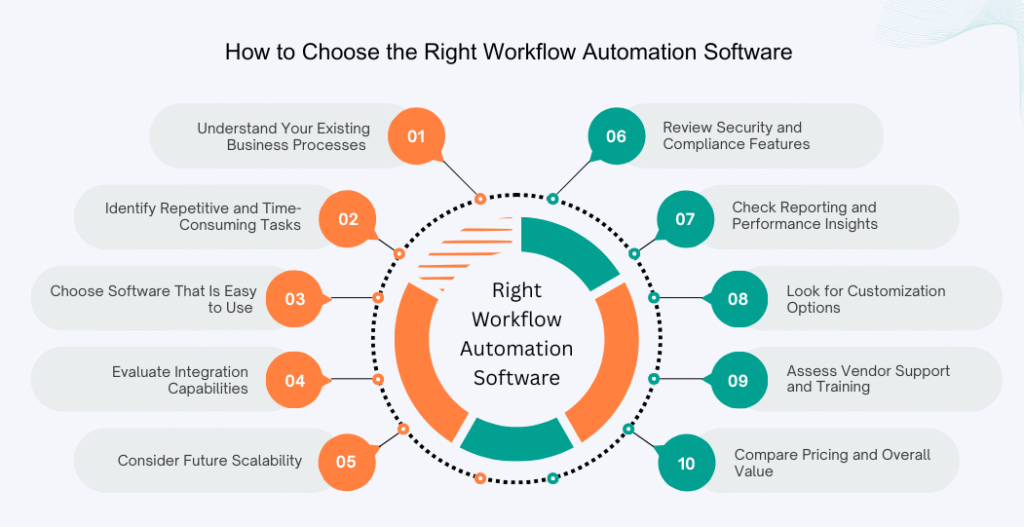
Understand Your Existing Business Processes
Before evaluating software, take time to understand how your current workflows operate. Identify the steps involved, the departments responsible, and where delays or inefficiencies commonly occur.
Having a clear understanding of your existing processes helps you choose software that solves real business challenges instead of introducing unnecessary complexity.
Identify Repetitive and Time-Consuming Tasks
Not every business process needs automation. Focus first on activities that consume significant time, require repeated manual effort, or frequently experience delays.
Common candidates include employee onboarding, purchase approvals, invoice processing, customer enquiries, support ticket routing, and document approvals.
Starting with high-impact processes allows businesses to achieve faster returns from workflow automation.
Choose Software That Is Easy to Use
The best workflow automation software should simplify work rather than create additional challenges. An intuitive interface allows employees to create, update, and manage workflows without extensive technical knowledge.
User-friendly software also reduces training requirements and encourages faster adoption across the organization.
If employees find the platform difficult to use, even powerful features may remain underutilized.
Evaluate Integration Capabilities
Workflow automation works best when it connects with the business applications you already use.
Before making a decision, verify whether the software integrates with systems such as CRM platforms, ERP software, email services, HRMS applications, accounting tools, helpdesk solutions, and collaboration platforms.
Strong integration capabilities reduce duplicate data entry and ensure information flows smoothly across different business functions.
Consider Future Scalability
Business needs change over time. The software you choose today should continue supporting your operations as your organization grows.
Look for a solution that can accommodate increasing users, additional departments, more complex workflows, and higher transaction volumes without requiring a complete system replacement.
Scalable software protects your investment and reduces future implementation costs.
Review Security and Compliance Features
Workflow automation often involves sensitive employee, customer, or financial information. Security should therefore be a key consideration during software selection.
Look for features such as role-based access control, data encryption, secure authentication, audit logs, and compliance support where applicable.
A secure platform helps protect business data while maintaining customer trust.
Check Reporting and Performance Insights
Automation should not only complete tasks but also provide visibility into process performance.
Choose software that offers dashboards, workflow analytics, completion reports, approval tracking, and performance metrics. These insights help identify bottlenecks, measure productivity improvements, and support continuous process optimization.
Look for Customization Options
Every business operates differently. A workflow automation solution should allow organizations to customize workflows, forms, notifications, approval rules, and business logic according to their requirements.
Flexible customization ensures the software adapts to your business rather than forcing your business to change its established processes unnecessarily.
Assess Vendor Support and Training
Successful implementation depends not only on software but also on the support provided by the vendor.
Consider whether the provider offers onboarding assistance, technical support, user documentation, product updates, and employee training resources.
Reliable support becomes especially valuable when expanding automation across multiple departments.
Compare Pricing and Overall Value
While pricing is always an important consideration, selecting software based solely on cost may not deliver the best long-term results.
Instead of focusing only on the initial subscription fee, evaluate the overall value the platform provides. Consider implementation costs, training requirements, scalability, available features, integration capabilities, customer support, and expected productivity improvements.
Choosing a solution that aligns with your business goals will often deliver greater returns than selecting the lowest-priced option.
Common Use Cases of Workflow Automation Software Across Industries
Workflow automation software is flexible enough to support businesses across different industries and departments. While every organization has unique processes, the goal remains the same: reduce manual work, improve efficiency, and ensure tasks are completed consistently. Here are some common ways businesses use workflow automation.
Human Resources (HR)
HR teams manage several repetitive processes that require coordination between employees, managers, and other departments. Workflow automation helps streamline these activities while ensuring every step is completed on time.
For example, when a new employee joins the organization, the onboarding process can automatically assign tasks such as document verification, IT account creation, equipment allocation, training schedules, and policy acknowledgements. Similarly, employee leave requests can be submitted through an online form, routed to the reporting manager for approval, and updated in the HR system once approved.
Automating these processes reduces administrative work and creates a better experience for both HR teams and employees.
Sales
Sales teams work with multiple leads and customer enquiries every day. Managing these opportunities manually can result in delayed responses and missed business opportunities.
Workflow automation software can automatically assign new leads to the appropriate sales representative based on predefined criteria such as location, industry, or product interest. It can also schedule follow-up reminders, notify sales managers about high-priority opportunities, and update customer records without manual effort.
This enables sales teams to respond more quickly while ensuring every lead receives timely attention.
Finance
Finance departments often handle approval-based processes that require accuracy and compliance. Manual approvals can slow down financial operations and increase the likelihood of errors.
Workflow automation simplifies invoice approvals by routing invoices to the appropriate managers, sending reminders for pending approvals, and maintaining a complete approval history. Expense reimbursement requests can follow a similar process, reducing paperwork while improving transparency and accountability.
As a result, finance teams can process transactions more efficiently while maintaining better control over financial operations.
Customer Support
Providing fast and consistent customer support is essential for maintaining customer satisfaction. Workflow automation helps support teams respond more efficiently by organizing incoming requests and reducing manual coordination.
When a customer submits a support request, the software can automatically create a ticket, assign it to the appropriate support agent based on the issue type or priority, and notify the customer that their request has been received. If a ticket remains unresolved beyond a specified timeframe, it can automatically be escalated to a senior support representative.
This structured approach improves response times and ensures customer issues are handled promptly.
Operations
Operational teams manage numerous internal requests that involve multiple approvals and departments. Workflow automation helps standardize these processes and improve overall efficiency.
For example, purchase requests can be automatically routed through the required approval levels before reaching the procurement team. Similarly, asset management workflows can track equipment requests, approvals, allocations, maintenance schedules, and returns from a single system.
By automating operational processes, businesses reduce delays while maintaining better visibility into everyday activities.
Common Mistakes to Avoid When Implementing Workflow Automation Software
Although workflow automation offers significant benefits, successful implementation requires careful planning. Avoiding a few common mistakes can help businesses achieve better results and maximize their investment. One common mistake is automating inefficient processes without first reviewing how they work. Automation improves existing workflows, but it cannot fix poorly designed processes. Before introducing automation, businesses should simplify and standardize their workflows.
Another mistake is choosing software that is overly complex for the organization’s needs. A platform with numerous advanced features may seem attractive, but if employees find it difficult to use, adoption will be slow and productivity gains may be limited.
Businesses should also avoid overlooking employee training. Even user-friendly software requires proper guidance to ensure employees understand how to use it effectively. Providing training encourages adoption and helps teams take full advantage of the platform. Ignoring system integrations is another common challenge. Workflow automation should work seamlessly with existing business applications such as CRM, ERP, HRMS, email, and helpdesk systems. Without proper integration, businesses may continue to rely on manual data entry and disconnected processes.
Finally, many organizations make the mistake of focusing only on price. While cost is important, selecting software based solely on the lowest price may result in limited functionality, poor scalability, or insufficient support. It’s better to evaluate the overall value the solution brings to your business.
Conclusion
Workflow automation software has become an essential tool for businesses looking to improve efficiency, reduce repetitive work, and streamline everyday operations. By automating routine tasks, organizations can save time, minimize manual errors, improve collaboration, and create more consistent business processes across departments.
However, choosing the right workflow automation solution requires careful planning. Businesses should evaluate their existing workflows, identify areas that would benefit most from automation, and select software that offers ease of use, scalability, strong integration capabilities, and reliable reporting features.
Whether you’re improving employee onboarding, automating invoice approvals, managing customer support, or streamlining internal operations, the right workflow automation software can help your business work smarter and adapt more effectively as it grows.
Taking the time to assess your requirements before making a decision will help ensure you invest in a solution that supports both your current needs and future business goals.
FAQ
What is workflow automation software?
Workflow automation software is a digital solution that automates repetitive business processes using predefined rules. It automatically routes tasks, sends notifications, manages approvals, and tracks workflows, reducing the need for manual intervention while improving operational efficiency.
How does workflow automation improve business efficiency?
Workflow automation eliminates repetitive manual tasks, reduces processing time, minimizes errors, improves collaboration between departments, and provides better visibility into business processes. This enables employees to focus on higher-value work while ensuring tasks are completed more quickly and consistently.
Which business processes can be automated?
Many routine business activities can be automated, including employee onboarding, leave management, invoice approvals, purchase requests, sales lead assignment, customer support ticket routing, expense approvals, document management, and internal approval workflows.
Is workflow automation suitable for small businesses?
Yes. Workflow automation is beneficial for businesses of all sizes. Small businesses can reduce administrative workload, improve productivity, and manage growth more efficiently without increasing manual effort. As the business expands, automation also helps maintain consistent processes.
How do I choose the best workflow automation software?
Start by identifying the business processes you want to automate. Then evaluate software based on ease of use, integration capabilities, customization options, reporting features, scalability, security, vendor support, and overall value rather than focusing only on pricing.
What is the difference between workflow automation and business process automation?
Workflow automation focuses on automating specific tasks and workflows within a business process, such as approvals, notifications, or task assignments. Business Process Automation (BPA) takes a broader approach by optimizing and automating entire end-to-end business processes that may involve multiple workflows, systems, and departments.