
Introduction
Modern businesses receive customer and employee support requests through multiple channels, including emails, chat platforms, websites, phone calls, and social media. As the number of requests grows, managing support operations manually becomes challenging. Important issues may get delayed, communication gaps can occur, and tracking customer satisfaction becomes difficult.
This is where helpdesk software helps organizations streamline their support processes. However, selecting the right solution requires more than simply choosing a ticketing tool. Businesses need to evaluate essential helpdesk software features that improve efficiency, automate repetitive tasks, enhance customer experience, and provide better visibility into support performance.
The right helpdesk solution enables teams to organize requests, prioritize critical issues, automate workflows, and deliver faster resolutions. Whether you are a growing business, IT service provider, or enterprise organization, understanding these capabilities helps you choose software that matches your operational requirements.
In this article, we will explore the 15 essential helpdesk software features every business should consider before implementing a helpdesk solution.
What Are Helpdesk Software Features?
Helpdesk software features are the capabilities that help organizations manage, track, and resolve support requests efficiently. These features allow support teams to organize customer queries, automate workflows, improve communication, and monitor service performance.
A modern helpdesk solution combines ticket management, automation, reporting, integrations, and AI-powered capabilities to create a centralized support system. Instead of managing requests through scattered emails or spreadsheets, businesses can use helpdesk software to improve accountability, reduce response time, and deliver consistent support experiences.
The right combination of features helps businesses improve both customer satisfaction and internal productivity.
15 Essential Helpdesk Software Features Every Business Should Look For
1. Ticket Management System
A ticket management system is the foundation of any helpdesk software. It converts customer queries, technical issues, and service requests into organized tickets that support teams can track from creation to resolution.
Businesses can assign ticket priorities, monitor status updates, define ownership, and maintain complete interaction history. This ensures every request is properly managed without getting lost in emails or communication channels.
A centralized ticketing system also improves team collaboration because agents can view previous conversations, updates, and resolution details. This feature is essential for maintaining accountability and providing faster support.
2. Omnichannel Support
Customers today expect businesses to connect through their preferred communication channels. Omnichannel support allows helpdesk software to collect requests from multiple platforms and manage them from a single interface.
Common channels include:
- Live chat
- Phone calls
- Social media
- Website forms
Instead of switching between different platforms, support teams can handle all conversations through one system. This improves response efficiency, provides a consistent customer experience, and ensures no request is missed regardless of the communication channel used.
For businesses handling high customer interaction volumes, omnichannel capability is a critical helpdesk software feature.
3. Automated Ticket Routing
Automated ticket routing helps businesses assign incoming requests to the right team or support agent without manual intervention.
Based on predefined rules, tickets can be automatically routed according to:
- Department or category
- Priority level
- Customer type
- Agent availability
- Technical expertise
For example, a software issue can be directly assigned to the technical support team, while billing-related queries can reach the finance department.
This feature reduces response delays, improves workload distribution, and ensures issues are handled by the right people. Automated routing is especially valuable for organizations managing large volumes of support requests.
4. Workflow Automation
Workflow automation enables businesses to automate repetitive support processes and reduce manual effort. Instead of relying on employees to perform routine actions, helpdesk software can execute predefined workflows automatically. In many helpdesk implementations, organizations discover that support agents spend a significant amount of time on ticket assignment, status updates, and escalation coordination. Automating these routine activities helps reduce operational overhead and enables teams to focus more on issue resolution and customer interactions.
Common automation capabilities include:
- Automatic ticket assignment
- Notification alerts
- Escalation management
- Approval workflows
- Status updates
For example, if a critical ticket remains unresolved beyond a specific timeframe, the system can automatically notify managers or escalate the issue.
Automation improves operational efficiency, reduces human errors, and helps teams focus on complex customer issues.
Businesses looking to improve support productivity can explore customized automation solutions from Codeflix Global for helpdesk workflow optimization and integration.
5. SLA Management
Service Level Agreement (SLA) management helps organizations define and monitor service commitments for support requests.
A helpdesk solution with SLA capabilities allows businesses to track:
- Response time targets
- Resolution deadlines
- Escalation requirements
- Priority-based service commitments
For example, critical business issues may require immediate attention, while low-priority requests may have longer resolution timelines.
SLA tracking improves accountability by ensuring support teams meet agreed service standards. Automated escalation alerts also help managers identify delayed tickets before they impact customer satisfaction.
For IT service providers and enterprise support teams, SLA management is one of the most important helpdesk software features.
6. Knowledge Base and Self-Service Portal
A knowledge base allows businesses to create a centralized collection of helpful resources, including FAQs, user guides, documentation, and troubleshooting articles.
Instead of contacting support for common questions, customers and employees can find solutions independently through a self-service portal.
Benefits include:
- Reduced ticket volume
- Faster issue resolution
- Improved customer experience
- Better support team productivity
A well-maintained knowledge base also helps new employees and customers understand products or services more effectively.
Self-service capabilities are becoming increasingly important as businesses look for scalable support solutions. Organizations often notice that a large percentage of incoming support requests involve repetitive questions. A well-structured knowledge base can significantly reduce these requests while enabling support teams to focus on more complex issues that require human intervention.
7. AI Chatbot Integration
AI chatbot integration enables businesses to provide instant assistance without requiring human agents for every request.
Modern AI-powered chatbots can:
- Answer frequently asked questions
- Provide 24/7 customer assistance
- Create support tickets
- Collect initial issue details
- Assist support agents with responses
For common queries, chatbots provide immediate solutions and reduce workload on support teams. For complex issues, they can collect relevant information before transferring the conversation to an agent.
AI chatbot capability helps businesses improve response speed while delivering better customer engagement.
8. Reporting and Analytics
Reporting and analytics features help businesses understand support performance through measurable data.
Helpdesk software can provide insights into:
- Ticket volume trends
- Average resolution time
- Agent performance
- Customer satisfaction scores
- Response efficiency
These reports help managers identify bottlenecks, optimize workflows, and make data-driven decisions.
For example, increasing ticket volume in a specific category may indicate the need for better documentation or product improvements.
Analytics transforms support operations from a reactive process into a continuously improving system.
9. Customer Feedback Management
Customer feedback management helps businesses understand customer satisfaction and improve service quality.
Helpdesk solutions can collect feedback through:
- Customer Satisfaction (CSAT) surveys
- Rating systems
- Feedback forms
- Post-resolution surveys
Support teams can analyze customer responses to identify improvement areas and measure service effectiveness.
Regular feedback collection helps organizations understand customer expectations and improve their support strategies. It also allows businesses to identify successful processes and areas requiring attention.
10. CRM Integration
CRM integration connects helpdesk software with customer relationship management systems to provide complete customer information.
With CRM integration, support teams can access:
- Customer profiles
- Previous interactions
- Purchase history
- Communication records
This enables personalized support because agents understand the customer’s background before responding.
For example, an agent handling a customer issue can quickly review previous conversations and provide more relevant assistance.
CRM integration improves collaboration between sales, marketing, and support teams while creating a better customer experience.
11. IT Asset Management
IT asset management capabilities help organizations track and manage hardware, software, and employee devices.
Important capabilities include:
- Hardware inventory tracking
- Software license management
- Device assignment records
- Asset history tracking
For IT departments, this feature simplifies managing company resources and resolving technical issues faster.
When an employee reports a device problem, support teams can immediately access asset details and previous maintenance records.
IT asset management is especially valuable for organizations managing large technology environments.
12. Security and Role-Based Access
Security features ensure sensitive customer and business information remains protected.
Important security capabilities include:
- User permissions
- Role-based access control
- Audit logs
- Data protection measures
- Authentication controls
Role-based access ensures employees only access information relevant to their responsibilities. Audit logs help organizations track activities and maintain transparency.
For enterprises handling confidential customer data, strong security controls are essential when selecting helpdesk software.
13. Mobile Support
Mobile support enables support teams to manage requests from anywhere using smartphones or tablets.
Mobile helpdesk capabilities include:
- Ticket updates
- Push notifications
- Status monitoring
- Remote support management
This is particularly useful for field service teams and organizations with distributed employees.
Mobile accessibility ensures important issues can be reviewed and resolved even when team members are away from their desks.
14. Third-Party Integrations
Third-party integrations allow helpdesk software to connect with other business applications and improve workflow efficiency.
Common integrations include:
- CRM platforms
- ERP systems
- Microsoft Teams
- Slack
- Monitoring tools
- Business applications
Integrations eliminate data duplication and allow information to flow smoothly between systems.
For example, integrating monitoring tools with helpdesk software can automatically create tickets when system issues are detected.
Businesses should evaluate integration capabilities to ensure the helpdesk solution fits their existing technology environment.
15. AI-Based Predictive Support
AI-based predictive support uses artificial intelligence to identify potential issues before they become major problems.
Capabilities include:
- Predicting recurring issues
- Automatic ticket categorization
- Suggested solutions
- Proactive support recommendations
Instead of only reacting to customer problems, businesses can take preventive action.
For example, if a particular product issue consistently generates support tickets after updates or releases, AI can identify the pattern early and alert teams before ticket volumes increase significantly.
Predictive support represents the future of helpdesk management by combining automation, analytics, and artificial intelligence.
How to Select Helpdesk Software Based on Business Requirements
Different businesses require different helpdesk capabilities. Instead of selecting software based solely on available features, organizations should evaluate solutions in terms of their workflows, team structure, and customer support requirements.
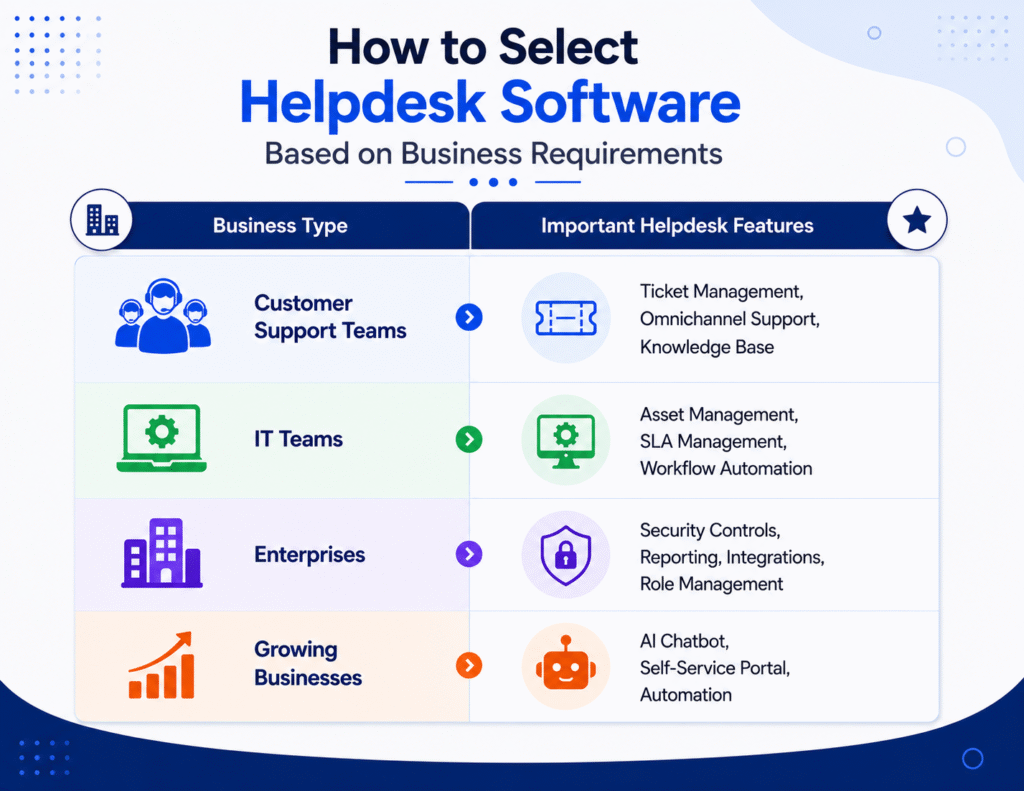
Choosing the right helpdesk software ensures businesses invest in features that directly improve operational efficiency and customer satisfaction.
Helpdesk Software Features Checklist
Before implementing helpdesk software, businesses should evaluate these essential capabilities
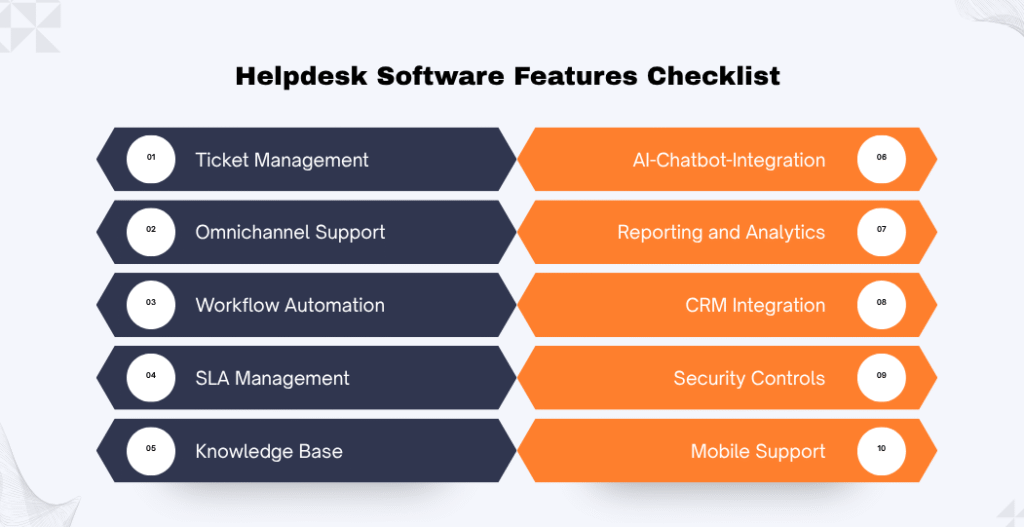
A feature checklist helps organizations compare solutions and select software that matches their business goals.
For businesses looking to improve customer engagement, automate sales, and provide personalized support, an AI chatbot for business offers significantly greater flexibility and long-term value than a traditional rule-based chatbot.
Conclusion
The right helpdesk software can transform customer support operations by improving response speed, increasing team productivity, and creating better customer experiences. However, businesses should not select a solution based only on popularity or pricing. Evaluating essential helpdesk software features based on operational requirements is critical for long-term success. Features such as ticket management, automation, SLA tracking, AI capabilities, reporting, and integrations help businesses build an efficient and scalable support system.
Codeflix helps businesses implement customized helpdesk solutions with workflow automation, AI integration, system optimization, and business-specific configurations. By selecting the right technology approach, organizations can improve support efficiency and deliver better service experiences.
FAQ
What are the essential helpdesk software features?
Essential helpdesk software features include ticket management, omnichannel support, workflow automation, SLA management, knowledge base, AI chatbot integration, reporting and analytics, CRM integration, security controls, mobile support, and third-party integrations. These features help businesses manage support requests efficiently and improve customer satisfaction.
Why are helpdesk software features important for businesses?
Helpdesk software features help businesses streamline support operations, automate repetitive tasks, reduce response times, improve team collaboration, and deliver better customer experiences. Choosing the right features ensures the software aligns with business goals and scales as support demands grow.
Which helpdesk software features should small businesses prioritize?
AI chatbots improve response times, enhance customer experience, reduce operational costs, automate repetitive tasks, increase lead conversions, and provide valuable business insights through analytics.
How does workflow automation improve helpdesk efficiency?
Workflow automation eliminates repetitive manual tasks by automatically assigning tickets, sending notifications, escalating unresolved issues, and updating ticket statuses. This reduces human errors, speeds up response times, and allows support agents to focus on resolving complex customer issues.
What is SLA management in helpdesk software?
SLA (Service Level Agreement) management helps businesses define response and resolution time targets for support requests. It tracks whether service commitments are met and automatically escalates tickets at risk of missing agreed-upon deadlines, helping organizations maintain consistent service quality.
How does AI improve helpdesk software?
AI enhances helpdesk software by automating routine tasks, answering frequently asked questions through chatbots, categorizing tickets, suggesting solutions, and identifying recurring issues. These capabilities improve response speed, reduce agent workload, and create a better support experience.
What is the benefit of integrating CRM with helpdesk software?
CRM integration gives support agents access to customer profiles, purchase history, previous interactions, and communication records from a single interface. This enables personalized support, faster issue resolution, and better collaboration between customer support, sales, and marketing teams.
How do third-party integrations enhance helpdesk software?
Third-party integrations connect helpdesk software with business applications such as CRM platforms, ERP systems, collaboration tools, and monitoring software. This eliminates duplicate work, improves data sharing, and creates more efficient business workflows.
What security features should businesses look for in helpdesk software?
Businesses should look for role-based access control, user permissions, audit logs, authentication controls, and data protection measures. These security features help protect sensitive customer information, ensure compliance, and prevent unauthorized access to support data.
How do I choose the right helpdesk software for my business?
When choosing helpdesk software, evaluate your business size, support channels, workflow requirements, automation needs, integration capabilities, security requirements, and future scalability. Selecting a solution based on your operational requirements rather than just the number of features will provide better long-term value.