
Introduction
Many organizations are unaware that they actually need a helpdesk solution until support requests start falling through the cracks. What begins as a manageable inbox quickly turns into missed emails, duplicate responses, and frustrated customers as the business grows. Customers expect quick responses, personalized assistance, and seamless communication across multiple channels. At the same time, employees rely on internal support teams to resolve IT issues, HR requests, and operational challenges without delays. Managing all these requests through emails, phone calls, or spreadsheets can quickly become overwhelming.
This is where helpdesk solutions play a crucial role. A modern helpdesk solution centralizes customer and employee requests, tracks every interaction, and ensures that no issue goes unnoticed. Whether you’re a startup, a growing enterprise, or an established organization, implementing the right helpdesk system can significantly improve productivity, customer satisfaction, and operational efficiency.
In this comprehensive guide, you’ll learn what helpdesk solutions are, why businesses need them, their key features, benefits, real-world applications, and how to choose the right solution for your organization.
What Are Helpdesk Solutions?
Before selecting a platform, it’s important to understand the essential helpdesk software features that improve ticket management, automation, reporting, and customer support. Helpdesk solutions are software platforms designed to help businesses efficiently manage, track, prioritize, and resolve customer or employee support requests. They act as a centralized system where all service requests—commonly known as tickets—are recorded, assigned, monitored, and resolved within predefined service levels.
Instead of relying on scattered email conversations or phone calls, businesses can use a helpdesk solution to organize every interaction in one place. This ensures transparency, accountability, and faster resolution times.
Modern help desk platforms support multiple communication channels, including
- Phone
- Live Chat
- Web Forms
- Social Media
- Mobile Applications
- Customer Portals
Every request is automatically converted into a ticket, allowing support teams to prioritize tasks, assign ownership, track progress, and maintain a complete communication history.
Example
Imagine an e-commerce company receiving hundreds of customer inquiries every day regarding order status, product returns, and payment issues.
Without a helpdesk solution:
- Emails get buried in inboxes.
- Duplicate responses occur.
- Some customer issues are accidentally missed.
- Managers struggle to monitor team performance.
With a helpdesk solution:
- Every inquiry becomes a ticket.
- Tickets are automatically categorized.
- High-priority issues are escalated immediately.
- Managers can monitor response times and agent productivity through business intelligence dashboards.
The result is a smoother support process, happier customers, and improved operational efficiency.
Why Modern Businesses Need Helpdesk Solutions
Businesses today operate in a fast-paced digital environment where customers expect immediate assistance. Delayed responses or unresolved issues can lead to dissatisfaction, negative reviews, and lost business opportunities. A helpdesk solution addresses these challenges by providing a structured approach to customer and employee support.
1. Faster Issue Resolution
In many growing businesses, delays are not caused by a lack of support staff but by poor request routing. A billing issue may sit with the technical team for hours before reaching the right department. In many growing businesses, delays are not caused by a lack of support staff but by poor request routing. A billing issue may sit with the technical team for hours before reaching the right department. Helpdesk solutions automatically assign tickets to the right team members based on predefined rules, ensuring faster response and resolution times. Helpdesk solutions automatically assign tickets to the right team members based on predefined rules, ensuring faster response and resolution times. For example, technical issues can be routed directly to IT specialists, while billing-related queries are assigned to the finance support team.
2. Better Customer Experience
Consistent communication builds trust. A helpdesk solution maintains the complete history of customer interactions, enabling support agents to understand previous conversations before responding. Many organizations also use AI chatbots to answer common questions instantly before escalating complex requests to support agents.
3. Improved Team Productivity
Support teams often spend valuable time manually assigning requests, following up with colleagues, or searching through email threads. Automation features reduce these repetitive tasks, allowing agents to focus on resolving customer problems rather than managing administrative work.
4. Centralized Support Management
Businesses frequently receive requests from multiple channels. Without a centralized system, information becomes fragmented.
Helpdesk solutions consolidate requests from every communication channel into a single dashboard, making it easier to manage workloads and monitor service quality.
5. Better Decision Making
Modern help desk platforms provide detailed reports and analytics, such as:
- Average response time
- Resolution time
- Customer satisfaction scores
- Agent productivity
- Ticket volume trends
- SLA compliance
These insights help management identify bottlenecks and continuously improve support operations.
How Helpdesk Solutions Work
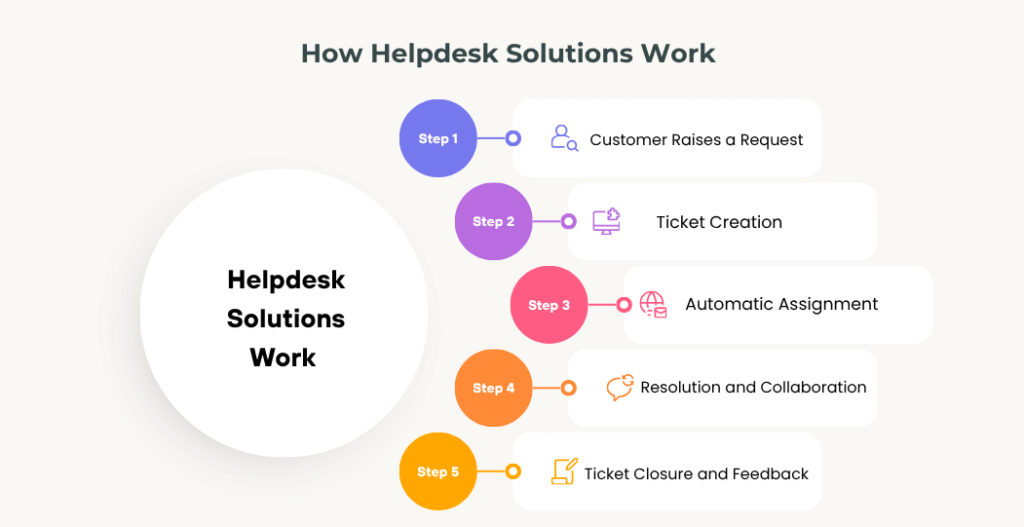
Although different platforms offer unique features, the overall workflow remains similar.
Step 1: Customer Raises a Request
A customer contacts the business through email, live chat, website, WhatsApp, or another communication channel.
Example:
A customer reports that their online payment failed despite the amount being deducted from their bank account.
Step 2: Ticket Creation
The helpdesk system automatically converts the request into a ticket.
The ticket typically contains:
- Ticket ID
- Customer details
- Issue description
- Priority level
- Category
- Time of creation
- Current status
This ensures every issue is documented and traceable.
Step 3: Automatic Assignment
Based on predefined workflows, the system assigns the ticket to the appropriate support team.
For instance:
- Technical Issue → IT Support
- Payment Issue → Finance Team
- Product Return → Customer Service
- Software Bug → Development Team
Automation reduces manual effort and minimizes delays.
Step 4: Resolution and Collaboration
If additional expertise is required, support agents can collaborate internally by adding notes, sharing files, or escalating the issue to senior specialists—all without losing ticket history. Customers continue receiving status updates throughout the process.
Step 5: Ticket Closure and Feedback
Once the issue is resolved, the ticket is closed. Many organizations also collect customer feedback through satisfaction surveys to measure service quality and identify opportunities for improvement.
Key Features of Modern Helpdesk Solutions
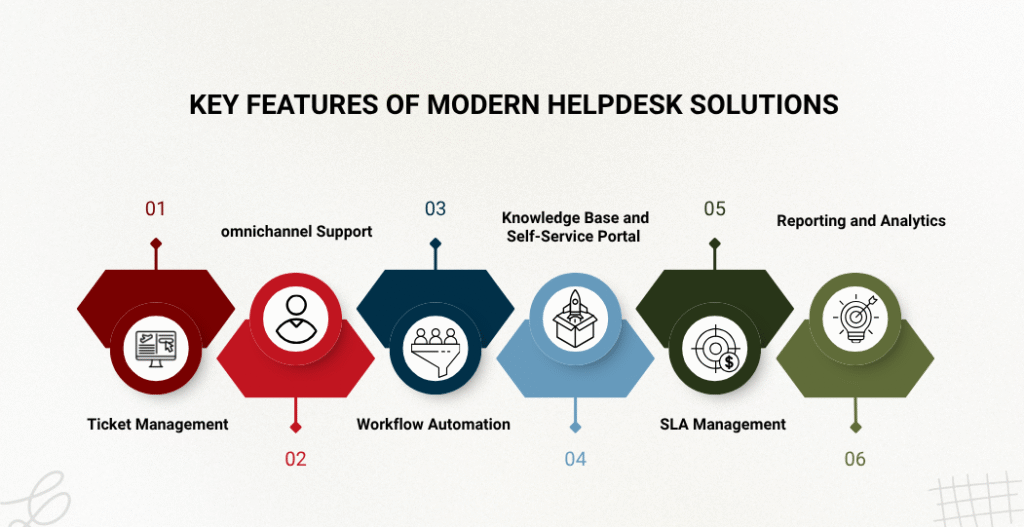
The capabilities of helpdesk platforms have evolved significantly over the years. Today’s solutions go far beyond simple ticket management and include intelligent automation, analytics, and AI-powered assistance.
Ticket Management
Ticket management forms the foundation of every helpdesk solution. One of the most common challenges support managers face is maintaining visibility when ticket volume increases. Without a structured ticketing process, it’s difficult to identify ownership and track unresolved requests.
It enables businesses to:
- Track every customer request
- Assign ownership
- Set priorities
- Monitor progress
- Maintain complete communication history
This prevents requests from being overlooked and improves accountability.
Omnichannel Support
Customers prefer different communication methods depending on their convenience. A modern helpdesk solution consolidates inquiries from multiple channels into a single interface, including:
- Live Chat
- Phone
- Social Media
- Customer Portals
Support agents can respond from a single dashboard without switching between applications.
Workflow Automation
Automation helps eliminate repetitive manual tasks.
Businesses can configure workflows to automatically:
- Assign tickets
- Escalate unresolved issues
- Send acknowledgment emails
- Notify managers
- Trigger follow-up reminders
- Route requests based on department
For organizations handling hundreds of support requests daily, automation significantly improves operational efficiency.
How Codeflix Can Help: At Codeflix, we implement customized helpdesk solutions with intelligent workflow automation tailored to each organization’s processes. Whether you need ticket routing based on departments, SLA-driven escalations, CRM integration, or automated notifications, our team designs workflows that reduce manual effort and improve service consistency.
Knowledge Base and Self-Service Portal
Many customers prefer solving simple issues on their own. A searchable knowledge base allows organizations to publish:
- Frequently Asked Questions (FAQs)
- User manuals
- Troubleshooting guides
- Video tutorials
- Product documentation
Self-service capabilities reduce ticket volumes while improving customer satisfaction.
SLA Management
Service Level Agreements (SLAs) define how quickly support teams should respond to and resolve different types of requests.
For example:
Service Level Agreements (SLAs) define the expected response and resolution times for different types of support requests. For example, a critical system outage may require an initial response within minutes and resolution within a few hours, while lower-priority requests can have longer response windows. By monitoring SLA compliance, businesses can ensure timely support, improve accountability, and consistently meet customer expectations. The system automatically monitors SLA compliance and alerts managers before deadlines are missed.
Reporting and Analytics
Data-driven insights help businesses continuously improve their support operations.
Useful reports include:
- Ticket trends
- Average resolution time
- First response time
- Customer satisfaction (CSAT)
- Agent performance
- Frequently reported issues
These metrics help organizations identify recurring problems and make informed operational decisions.
Benefits of Helpdesk Solutions for Businesses
Implementing a helpdesk solution delivers measurable improvements across customer service, internal operations, and business performance.
Faster Response Times
Automated ticket routing, predefined workflows, and centralized communication enable support teams to respond more quickly, reducing customer wait times and improving service quality.
Higher Customer Satisfaction
Customers appreciate timely updates, transparent communication, and consistent support. A helpdesk solution ensures every interaction is tracked, leading to a more reliable customer experience and stronger brand loyalty.
Improved Employee Productivity
By automating repetitive tasks and providing agents with complete customer histories, helpdesk solutions allow teams to resolve issues more efficiently and focus on delivering value rather than managing manual processes. In helpdesk implementations, organizations often discover that agents spend a significant portion of their time on ticket assignments, status updates, and follow-ups rather than problem-solving. Automating these activities can free up substantial time for higher-value work.
Real-World Use Cases of Helpdesk Solutions
Helpdesk solutions are not limited to customer support. Today, organizations across industries use them to streamline internal operations, improve collaboration, and deliver better service experiences.
Manufacturing
Manufacturing companies often deal with equipment breakdowns, maintenance requests, vendor support, and production issues. Without a structured process, these requests can cause production delays.
Example:
A production machine suddenly stops working. Instead of informing the maintenance team through phone calls or emails, an operator raises a ticket through the helpdesk portal.
The system automatically:
- Assigns the ticket to the maintenance department.
- Marks it as High Priority.
- Sends notifications to technicians.
- Tracks the resolution time.
- Generates reports for future preventive maintenance.
This minimizes downtime and improves operational efficiency.
Retail & E-commerce
Retail businesses receive thousands of customer queries every month related to:
- Order tracking
- Product returns
- Refund requests
- Warranty claims
- Payment issues
A helpdesk solution consolidates all these requests into one dashboard, ensuring no customer inquiry is missed.
For example, a customer requesting a refund through WhatsApp and another contacting support via email can both be managed from the same platform.
Healthcare
Hospitals and healthcare providers use helpdesk solutions to manage:
- Appointment-related queries
- IT support requests
- Patient feedback
- Medical equipment maintenance
- Internal employee requests
Centralized ticket management helps healthcare organizations improve service quality while maintaining operational continuity.
Educational Institutions
Schools, colleges, and universities receive numerous support requests from students, faculty, and administrative staff.
Common requests include:
- Admission queries
- LMS login issues
- Fee payment assistance
- Examination support
- Technical issues
A helpdesk solution ensures these requests are routed to the appropriate departments, reducing response times and improving the overall student experience.
IT & Software Companies
IT organizations rely heavily on helpdesk solutions to manage:
- Software bugs
- User access requests
- Password resets
- Infrastructure incidents
- Change requests
- Asset management
By integrating helpdesk software with monitoring tools, organizations can automatically generate tickets when systems detect failures or performance issues.
Helpdesk Solutions vs Traditional Email Support
Many businesses begin their customer support journey by managing inquiries through a shared email inbox. While this approach may work when request volumes are low, it often becomes difficult to manage as the business grows. With traditional email support, customer requests can get buried in long email threads, making it challenging to track conversations, assign responsibilities, or monitor response times. As multiple team members access the same inbox, duplicate replies, missed emails, and delayed resolutions become increasingly common.
In contrast, Helpdesk Solutions provides a centralized platform where every customer request is automatically converted into a ticket. Each ticket is assigned to a unique identifier, making it easy to track its progress from creation to resolution. Support teams can prioritize urgent issues, assign tickets to the appropriate department, collaborate internally, and maintain a complete history of customer interactions—all from a single dashboard.
Another significant advantage is automation. Modern helpdesk solutions can automatically route tickets, trigger notifications, monitor Service Level Agreements (SLAs), and generate performance reports. These capabilities reduce manual effort, improve response times, and help businesses deliver a more consistent customer experience.
As organizations grow and customer expectations continue to rise, transitioning from traditional email support to a dedicated helpdesk solution enables support teams to work more efficiently, improve accountability, and provide faster, more reliable service. For businesses handling dozens or hundreds of support requests each week, a dedicated helpdesk solution provides greater visibility, accountability, and efficiency than email alone.
Helpdesk vs Service Desk vs ITSM
These terms are often used interchangeably, but they serve different purposes.
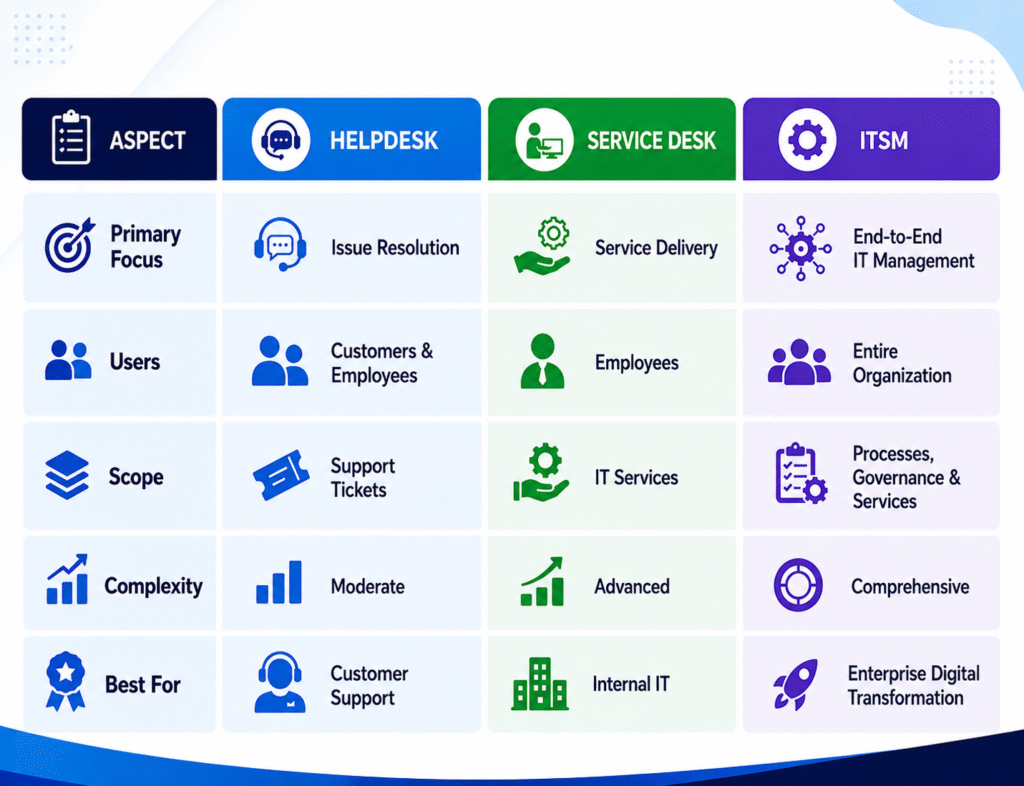
In simple terms:
- A Helpdesk focuses on resolving support requests.
- A Service Desk manages broader IT services, including requests and changes.
- IT Service Management (ITSM) encompasses the complete lifecycle of IT services, governance, processes, and continual improvement.
Understanding these differences helps businesses choose a solution that aligns with their operational needs.
How to Choose the Right Helpdesk Solution
Implementing a helpdesk solution involves more than selecting software. Success depends on configuring workflows that match your organization’s processes. At Codeflix, we help businesses design and implement helpdesk solutions that streamline customer support and internal service operations. Our approach focuses on improving efficiency through automation, integration, and process optimization. In many helpdesk implementation projects, organizations discover that delayed response times are often caused by inconsistent processes rather than a lack of resources. Requests may move between departments without clear ownership, resulting in missed SLAs and reduced visibility. Establishing structured workflows and automated routing helps teams improve accountability, accelerate resolution times, and maintain consistent service levels.
Our capabilities include:
- Helpdesk implementation and configuration
- Workflow automation for faster ticket handling
- CRM and ERP integration
- AI-powered chatbot integration for first-level support
- SLA setup and escalation management
- Custom dashboards and reporting
- Knowledge base implementation
- Ongoing optimization and support
Rather than using a one-size-fits-all approach, we work with organizations to build workflows that align with their business goals and operational requirements.
Emerging Trends in Helpdesk Solutions
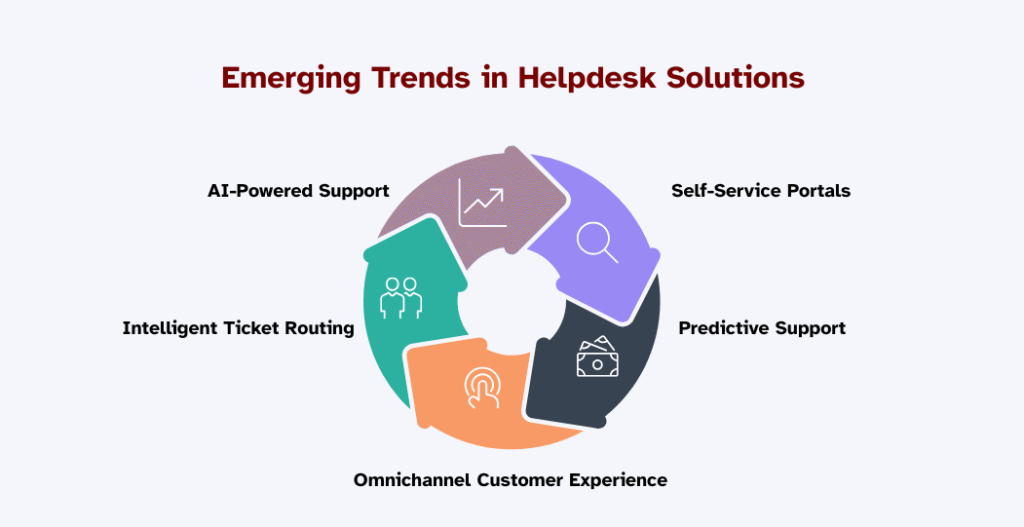
Modern helpdesk platforms continue to evolve as businesses embrace automation and artificial intelligence.
AI-Powered Support
AI assistants can answer frequently asked questions, categorize tickets, and recommend solutions based on historical data, allowing support agents to focus on more complex issues.
Intelligent Ticket Routing
Machine learning helps identify the nature and urgency of requests, ensuring tickets reach the right team without manual intervention.
Omnichannel Customer Experience
Customers expect consistent support across email, chat, social media, and messaging apps. Omnichannel capabilities provide a unified experience regardless of the communication channel.
Self-Service Portals
Interactive knowledge bases and self-service portals empower users to resolve common issues independently, reducing ticket volumes and improving satisfaction.
Predictive Support
Advanced analytics can identify recurring issues and recommend proactive actions before they impact customers or business operations.
For example, if a particular software update consistently generates support tickets after release, predictive analytics can help teams identify the pattern early and address the root cause before ticket volumes spike.
Conclusion
Providing exceptional support is no longer just a customer service objective—it has become a key driver of business growth and long-term customer loyalty. As organizations scale, managing support requests through emails and spreadsheets becomes increasingly inefficient, leading to slower response times and inconsistent service.
A modern helpdesk solution brings structure, visibility, and automation to support operations. By centralizing requests, streamlining workflows, enabling collaboration, and delivering actionable insights, businesses can improve both customer satisfaction and operational efficiency.
Whether you’re looking to modernize customer support, simplify internal IT services, or automate business workflows, implementing the right helpdesk solution can make a significant difference.
If you’re planning to adopt or optimize a helpdesk platform, contact our team to discuss your requirements. We’ll help you design and implement a helpdesk solution tailored to your business processes. From workflow automation and AI-powered support to seamless system integrations and analytics, we work with you to build a scalable support ecosystem that grows with your business.
FAQ
What are Helpdesk Solutions?
Helpdesk solutions are software platforms that help businesses manage, track, prioritize, and resolve customer or employee support requests through a centralized ticketing system.
What is the main purpose of a Helpdesk Solution?
The primary purpose is to improve support efficiency by organizing requests, automating workflows, reducing response times, and enhancing customer satisfaction.
Are Helpdesk Solutions suitable for small businesses?
Yes. Modern cloud-based helpdesk platforms are scalable and can support businesses of all sizes, from startups to large enterprises.
What features should a Helpdesk Solution include?
Essential features include:
- Ticket management
- Workflow automation
- SLA management
- Reporting and analytics
- Knowledge base
- Omnichannel support
- Integration capabilities
- AI-powered automation
What is the difference between a Helpdesk and a Service Desk?
A helpdesk primarily focuses on resolving support requests, while a service desk manages broader IT services, including service requests, change management, and IT service delivery.
Can Helpdesk Solutions integrate with CRM systems?
Yes. Many helpdesk platforms integrate with CRM systems, enabling support teams to access customer information and interaction history from a single interface.
How do Helpdesk Solutions improve customer satisfaction?
By reducing response times, improving communication, automating routine tasks, and ensuring every request is tracked until resolution
Can AI improve Helpdesk operations?
Yes. AI can automate repetitive tasks, recommend solutions, categorize tickets, power chatbots, and improve agent productivity
Which industries benefit most from Helpdesk Solutions?
Industries such as manufacturing, healthcare, retail, education, banking, logistics, telecommunications, and IT services commonly use helpdesk solutions to improve service delivery.
How long does it take to implement a Helpdesk Solution?
Implementation timelines vary depending on business complexity, integrations, and customization requirements. Basic deployments may take a few days, while enterprise implementations can take several weeks.