
Introduction
Businesses handle hundreds of tasks every day. Employees enter data, respond to emails, review documents, process requests, manage approvals, update systems, and prepare reports. These tasks are important, but many of them are repetitive and take up valuable employee time. As a business grows, manual work can become harder to manage. A simple process that takes a few minutes may not seem like a problem when it happens once. But when employees repeat the same task hundreds of times, the time and effort can add up quickly.
Traditional automation can reduce some of this work by following predefined rules. But many business processes involve emails, documents, customer messages, and other information that is not always structured. This is where AI business process automation can help. It combines AI with workflows, business rules, and system integrations to handle processes that need some level of understanding before the next action can happen. The goal is not to automate every task. The goal is to find the right processes where automation can save time, reduce errors, and help employees focus on more valuable work.
What Is AI Business Process Automation?
Business process automation means using technology to perform repetitive business tasks with less manual effort. It can move information between systems, send notifications, route requests, update records, and trigger actions based on predefined conditions. AI business process automation adds AI to these workflows.
Instead of only following fixed rules, the system can read information, classify requests, extract data, identify patterns, or understand written messages before deciding what should happen next.
For example, consider invoice processing. In a traditional process, an employee may open an invoice, read the details, enter the information into a system, and send it to the appropriate person for approval. With AI-powered automation, the system can read the invoice, extract the supplier name and amount, identify the type of document, check the information against business rules, and send it to the right person for approval. The important difference is simple: Traditional automation follows rules. AI helps understand information before the workflow takes action.
Businesses can use all three approaches depending on the process:
- Manual process: Employees handle every step.
- Traditional automation: Software follows predefined rules.
- AI-powered automation: AI helps understand information while automation manages the process.
Traditional Automation vs AI-Powered Automation
AI automation does not replace traditional automation. In many cases, the two work better together.
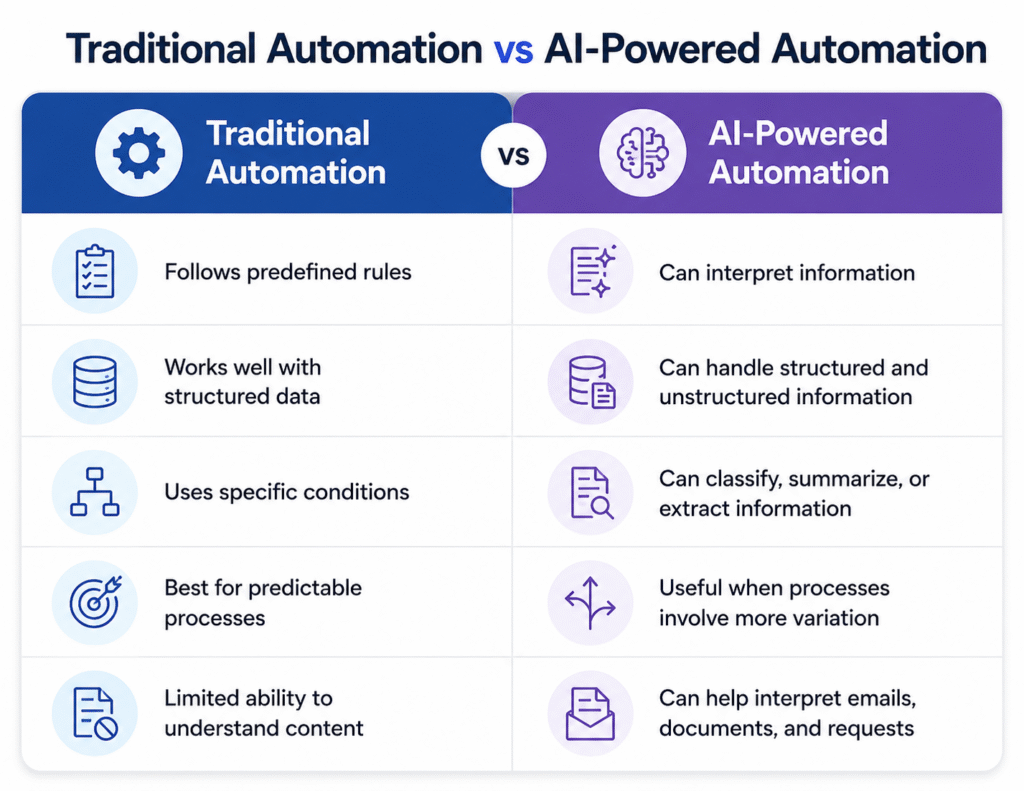
For example, a simple approval process may only need traditional automation: Request submitted → Check amount → Send for approval
But if an employee sends an email containing the request, the system may first need to understand the email, identify the request type, extract the required information, and then start the correct workflow. That is where AI can add value.
How Does AI Business Process Automation Work?
An AI-powered business process usually involves several connected steps. The process can start with an email, document, customer request, form, image, or information from another business application. AI processes the information and identifies what it contains. Depending on the use case, this may involve data extraction, text understanding, classification, or pattern recognition.
The workflow then applies business rules and moves the task to the appropriate next step. For example, when a customer sends an email, AI can identify the purpose of the request and classify it. The workflow can then create a ticket, assign it to the right team, and notify the appropriate agent.
APIs and integrations can connect the workflow with CRM platforms, ERP systems, helpdesk software, databases, email systems, and other business applications.
Human review can also remain part of the process. For example, an AI system may identify and classify an expense, while a manager still reviews and approves the payment. This approach allows businesses to automate repetitive work without removing people from decisions that require experience, responsibility, or judgement.
Business Processes You Can Automate with AI
AI-powered automation can be used across different departments. The right opportunity depends on the type of work, how often it happens, and the systems already used by the business.
Customer Support
Customer support teams often receive a large number of similar requests. AI can help classify incoming queries, identify their purpose, route them to the right team, suggest responses, and escalate complex issues.
For example: Customer request → AI identifies issue → Ticket created → Ticket assigned → Agent handles complex issue
This reduces the amount of manual sorting and routing done by support teams.
Finance and Accounts
Finance teams regularly work with invoices, expense claims, payment requests, and supporting documents.
AI can extract information from documents, identify missing details, classify invoices, and start approval workflows.
Instead of checking every document manually, employees can focus on exceptions and requests that need closer attention.
HR and Recruitment
Recruitment involves reviewing applications, collecting documents, scheduling interviews, and managing employee information.
Automation can help organize applications, extract relevant information from resumes, trigger interview scheduling, and support employee onboarding.
For example, once a candidate reaches a particular stage, a workflow can automatically send the next communication or start the required onboarding process.
Sales and Marketing
Sales teams can automate lead-related activities such as lead qualification, assignment, CRM updates, and follow-up reminders.
AI can help understand incoming enquiries and group leads based on relevant information before the workflow sends them to the appropriate salesperson.
Business Operations
Operations teams manage internal requests, documents, approvals, reports, and information across different systems.
AI-powered workflows can process documents, route requests, synchronize information, generate routine reports, and notify employees when action is required.
The strongest opportunities are usually processes where employees perform similar tasks repeatedly but still need to work with different types of information.
Benefits of AI Business Process Automation
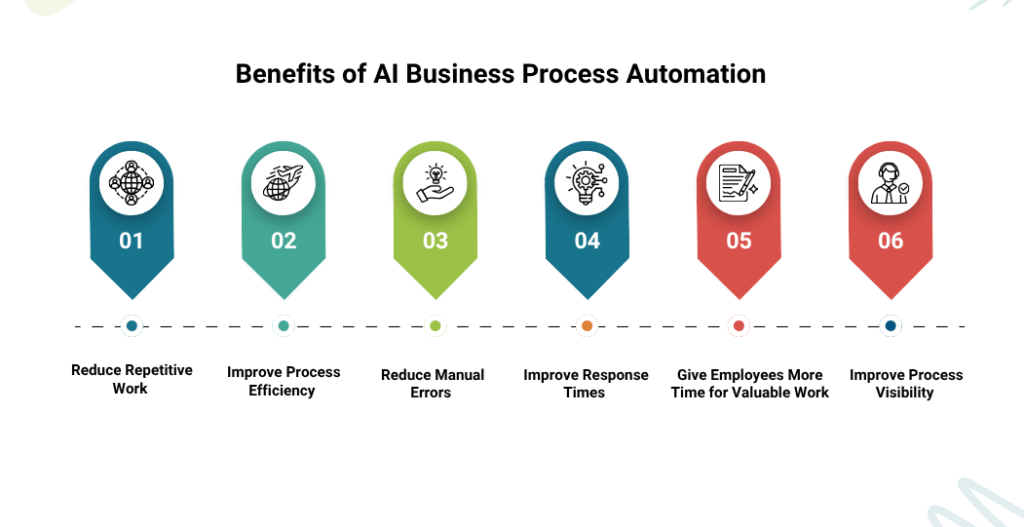
Reduce Repetitive Work
Employees can spend less time entering data, checking documents, sorting emails, and handling routine administrative tasks.
This gives them more time for customer conversations, problem-solving, planning, and other work that needs human attention.
Improve Process Efficiency
Automated workflows can move information between departments and systems without waiting for every step to be completed manually.
This can help reduce unnecessary delays in everyday processes.
Reduce Manual Errors
Repeated data entry can lead to mistakes, especially when employees have to copy information between different systems.
Automation can handle defined steps consistently and transfer information between connected systems with less manual input.
Improve Response Times
When requests can be classified and routed automatically, employees can respond faster.
Documents, support tickets, approvals, and internal requests can also move through the workflow without unnecessary waiting.
Give Employees More Time for Valuable Work
The purpose of automation is not simply to make employees work faster.
It is also about reducing low-value repetitive work so employees can spend more time on activities that require communication, judgement, creativity, and problem-solving.
Improve Process Visibility
A well-designed automated workflow makes it easier to see where a task is, who needs to act, and where delays are happening. Managers can use this information to identify bottlenecks and improve the process.
How to Choose the Right Processes for AI Automation
Not every business process needs AI. Choosing the right process is one of the most important parts of an automation project.
Start with High-Volume Tasks
Look for tasks that employees perform many times each day or week.
Invoice processing, customer requests, document handling, and internal service requests can create significant amounts of repetitive work.
Focus on Repetitive Activities
Processes that follow similar steps are often easier to automate.
If employees repeatedly copy information, classify requests, update records, or send notifications, there may be a good opportunity for automation.
Understand the Process and Data
Before introducing AI, understand how the process currently works.
Identify:
- What information enters the process?
- What decisions are made?
- Which systems are involved?
- Who approves each step?
- What is the expected outcome?
The quality and availability of the data should also be considered.
Consider Business Impact
Automation should solve a real business problem.
Look at the time employees spend on the process, processing costs, response times, error rates, and delays.
This helps determine whether automation is worth the investment.
Check Existing Systems
Automation becomes more useful when it works with the systems a business already uses.
CRM, ERP, helpdesk, email, databases, and other applications can be connected to create a smoother process.
Start Small
Businesses do not need to automate an entire department at once.
Start with one process that has a clear problem and a measurable outcome. Once the workflow works well, it can be expanded to other suitable processes.
Real-World Example: Automating Invoice Processing
Invoice processing is a good example of how AI and workflow automation can work together.
Manual Process
Invoice received → Employee opens invoice → Reads details → Enters data → Checks information → Sends for approval → Updates records
Every invoice requires employee involvement, and the time required increases as invoice volume grows.
AI-Powered Process
Invoice received → AI extracts details → Invoice is classified → Information is checked → Workflow sends for approval → Records are updated → Exceptions go to an employee The employee does not have to manually review every standard invoice. They can focus on invoices with missing information, unusual amounts, or other exceptions. This same approach can be applied to many other business processes where information needs to be understood before an action is taken
How to Implement AI Business Process Automation
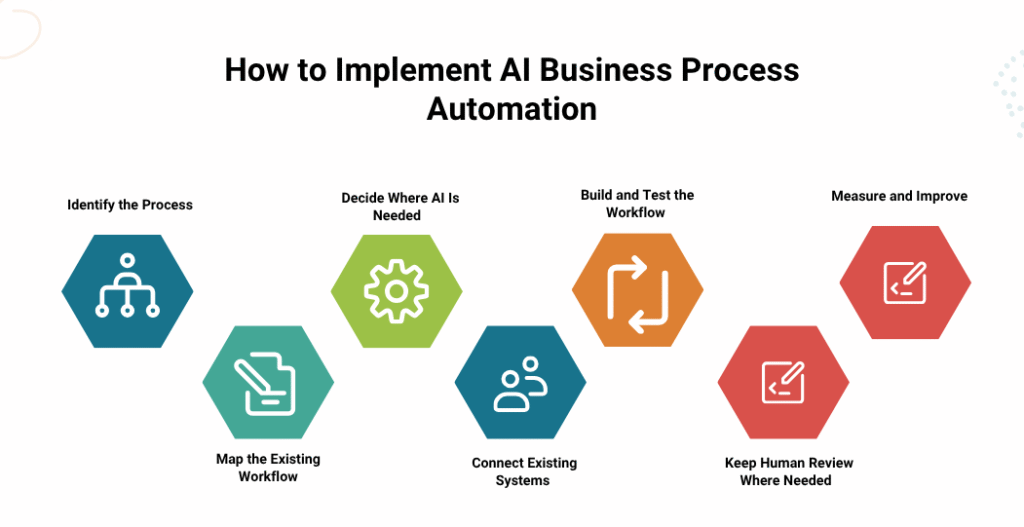
A structured approach can make automation easier to manage.
Step 1: Identify the Process
Choose a repetitive and time-consuming process that has a clear business need.
Step 2: Map the Existing Workflow
Document the inputs, actions, decisions, approvals, systems, and final outcomes.
This helps identify where manual work and delays occur.
Step 3: Decide Where AI Is Needed
Not every step needs AI.
Use traditional automation for simple and predictable tasks. Use AI where information needs to be interpreted, classified, or extracted.
Step 4: Connect Existing Systems
Connect applications such as CRM, ERP, helpdesk platforms, email systems, and databases through APIs or suitable integrations.
Step 5: Build and Test the Workflow
Test normal situations as well as incomplete information, unusual requests, and other exceptions.
The workflow should be checked before it becomes part of regular business operations.
Step 6: Keep Human Review Where Needed
Some decisions should remain with employees.
Human approval can be included for sensitive decisions, unusual cases, or situations where the system is not confident about the result.
Step 7: Measure and Improve
Track processing time, manual effort, errors, response times, and other relevant measures.
Use the results to identify areas where the workflow can be improved.
How to Measure the Results of AI Automation
Automation should be measured against the problem it was designed to solve.
Useful metrics include:
- Processing time: How long does the process take before and after automation?
- Manual hours saved: How much employee time is being spent on the process?
- Error rate: Are data entry or processing errors decreasing?
- Response time: Are customers or employees receiving faster responses?
- Automation rate: What percentage of tasks are completed without manual intervention?
- Exception rate: How often does a process need human review?
- Processing cost: Has the cost of completing each transaction changed?
These measures help businesses understand whether the automation is delivering practical value rather than simply adding another technology to the business.
Common Challenges of AI Business Process Automation
AI-powered automation can deliver useful results, but it requires proper planning.
Poor-Quality Data
AI-based processing depends on the information available to it. Incomplete, inconsistent, or poorly organized data can affect the results.
System Integration
Existing business applications may need additional integration work before information can move smoothly between systems.
Security and Privacy
Businesses should consider how customer, employee, financial, and other sensitive information is stored, accessed, and processed.
Employee Adoption
Employees need to understand how the new process works and when they are expected to review, approve, or take over a task.
Incorrect AI Decisions
AI may not always interpret unclear or unusual information correctly. Testing, clear rules, human review, and regular monitoring are important.
Automating the Wrong Process
Technology cannot fix a poorly designed process by itself.
Before automating, businesses should understand the current process and remove unnecessary steps where possible.
Conclusion: Start with the Right Process, Not More Technology
AI business process automation can help businesses reduce repetitive work, improve response times, connect different systems, and make everyday processes easier to manage. The best results come from combining AI with reliable workflows, business rules, system integrations, and human expertise.
Businesses do not need to automate everything at once. Starting with one process that creates a clear operational problem makes it easier to test the approach, measure the results, and expand automation later.
The focus should always remain on the business problem. Find where employees are spending too much time on repetitive work. Understand how the process currently operates. Then identify where AI and automation can make a meaningful difference.
Looking to reduce repetitive work across your business? Codeflix can help you identify suitable automation opportunities, connect your existing systems, and build AI-powered workflows around your business processes. Explore Business Process Automation Solutions, then Talk to Codeflix!
FAQ
What is AI business process automation?
AI business process automation combines artificial intelligence with workflows and business rules to automate repetitive tasks while allowing the system to understand and process different types of information.
How is AI automation different from traditional automation?
Traditional automation follows predefined rules and conditions. AI automation can also interpret information, classify content, extract data, and support workflows when the input is less predictable.
What business processes can be automated with AI?
Common examples include customer support, invoice processing, document handling, recruitment, lead management, approval processes, internal requests, reporting, and other repetitive business operations.
Can AI automation reduce manual work?
Yes. AI automation can reduce manual work involved in activities such as data entry, document processing, request classification, ticket routing, system updates, and routine notifications.
Does AI business process automation replace employees?
No. The purpose is to reduce repetitive work and allow employees to focus on tasks that require judgement, communication, problem-solving, and decision-making.
How do businesses choose processes to automate?
Start with processes that are repetitive, high-volume, time-consuming, and measurable. Businesses should also consider the systems involved, data quality, expected benefits, and the need for human review.
What systems can be connected to AI automation?
Depending on the business process, automation can connect CRM platforms, ERP systems, helpdesk software, databases, email systems, and other business applications through APIs and integrations.
How can businesses measure AI automation success?
Businesses can measure processing time, manual hours saved, error rates, response times, automation rates, exception rates, and processing costs before and after implementation.